CHS://LAB — GAME UPDATES

What's new in the Lab

Every change to Charleston AI: The Lab, newest first. It is a free browser game about taking the empty office at Charleston AI and building an AI business out of it. No download, no account, no wallet.

  1. IMPROVED

    What you promise now changes the pay and the review

    The terms you close a deal on now follow the project all the way to delivery. A discount pays less, a bigger promise raises the bar the client judges you against, and overpromising starts the build already carrying extra scope and AI debt.
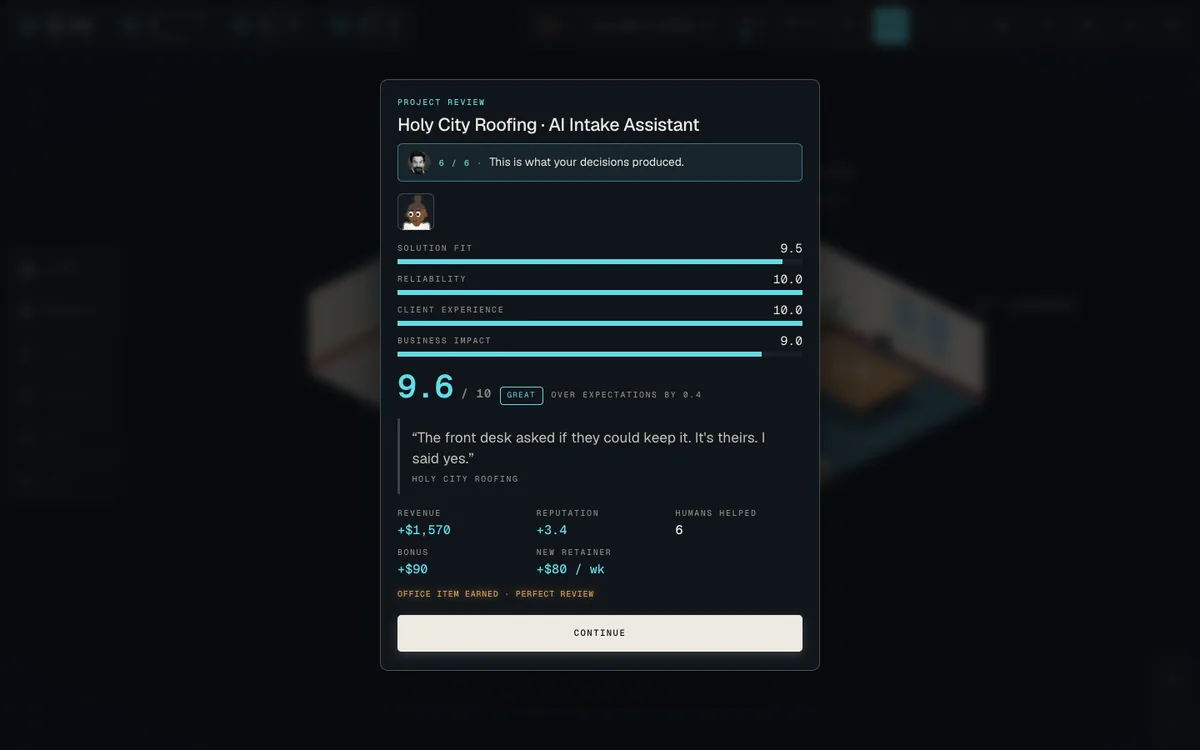
    A project review scoring solution fit, reliability, client experience and business impact, with revenue, reputation and a new retainer.
    The project review: what you promised, what you delivered, and what it paid.
    • Deals close as won, discounted, reduced scope, or with high expectations
    • A discounted deal pays less at completion; a high bar pays a premium
    • Overpromising adds scope pressure and starts the project in AI debt
    • The review shows what they needed, what you promised, what you delivered

    Worth knowing
    Only ordinary clients from leads that arrive after this update, and only once you are past your first two projects. Projects already in flight, special clients, cameos and event visitors keep the old behaviour.
  2. NEW

    Clients push back in meetings, and can walk away

    After you propose a solution, the client asks a question of their own. Your answer moves their trust against what they actually told you, and reading the room badly can lose the deal outright.

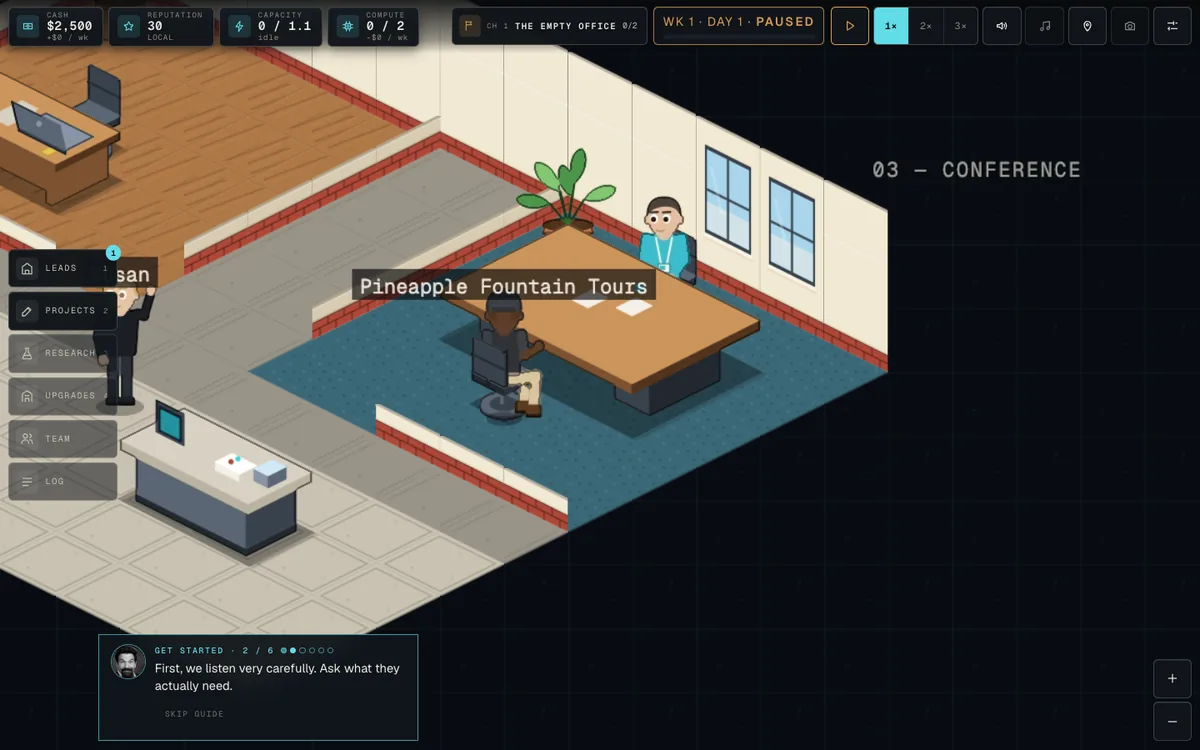
    The isometric conference room with the founder and a client from Pineapple Fountain Tours seated across the table.
    Room 03. First we listen very carefully.
    • A client question with three or four answers, after you choose the solution
    • Notes list only the facts you actually uncovered in discovery
    • Trust reads as a word: Skeptical, Cautious, Interested, Confident
    • A lost deal is real: no money, no project. Honestly disqualifying is separate

    Worth knowing
    Your first project can never be lost this way, and the second project's question is a low-stakes introduction with no walk-away risk. Leads already waiting at your door when the update landed keep the old meeting.

  3. NEW

    Browse the Charleston Network: activity and top Labs

    The Network gained pages worth browsing. There is a feed of what public Labs have been doing, leaderboards for this week and all time, and a Discover page for finding Labs to visit.

    • An Activity feed built from what public Labs actually published
    • Top Labs boards for this week (Monday to Monday, UTC) and all time
    • A Discover page that leads with the company name and keeps the Lab ID visible
    • Public profiles show their own recent activity and up to two rank chips

    Worth knowing
    The activity feed and the weekly board need a Lab's second publication before they have anything of their own, so right after a release they show real Labs borrowed from the other boards instead of inventing events.

  4. NEW

    Back up your Lab and continue it on a new device

    Once your Lab is signed in you can turn on an encrypted private backup. A different browser or device can then pick that Lab from Your Labs and continue exactly where you left off.

    • Cloud Backup lives in MY LAB, with a Back Up Now button
    • Backups run on their own after a local save; the game never waits on one
    • Your Labs offers Continue for any Lab that has a backup
    • If two devices diverge you get one sheet with two clear choices

    Worth knowing
    There is no backup history to browse and no way to restore an older revision on purpose. A corrupt newest backup falls back to the last healthy one automatically and tells you so. Cloud backup is a web feature; manual export and import stay for everything else.

  5. NEW

    Secure your Lab with an email sign-in

    You can attach your Lab to an account with an emailed code, so losing a browser does not mean losing your Lab's identity. Signing in elsewhere finds the Labs you secured.

    • Secure your Lab from MY LAB; sign-in is email only, no wallet
    • Your Labs in the site navigation lists the Labs on your account
    • "Already have a Lab? Sign in to find it on this device" under Take the office
    • Nothing from the sign-in library loads until you tap Secure your Lab

    Worth knowing
    Signing in secures your Lab's Network identity, not the save itself. Carrying your actual progress to another device needs Cloud Backup, which shipped the following day.

  6. NEW

    Publish your Lab and let people visit it

    Your company gets a public page on the Charleston Network once you finish your first project: a profile, a share card, and a read-only visit that renders your actual office.

    • MY LAB in Settings shows your Lab, its status and a one-tap PRIVATE switch
    • A visit renders the real office read-only: no clock, no saving, no changes
    • Every Lab gets a generated Charleston name; you can use your company name instead
    • The public page never carries your company name unless you choose it

    Worth knowing
    A Lab is public from the moment it is minted, which happens after your first completed project. What is published is a bounded snapshot, and PRIVATE removes the profile, the visit, the listings and the share card completely.

  7. NEW

    Hire a receptionist to screen who reaches you

    An Operations hire who caps how many ordinary inquiries wait at your door, so a busy late game stops burying you in walk-ins you will never get to.

    • Three policies: Open Door (no cap), Steady (4 waiting), Selective (2)
    • Hire from the Team panel; it costs a weekly salary and defaults to Steady
    • Rare, exceptional, legendary and special visitors are never screened
    • The Leads panel shows the policy, the queue and how many were screened

    Worth knowing
    The receptionist adds no delivery capacity, has no dedicated art or front desk in the office yet, and only affects future arrivals. A queue that is already waiting stays exactly as it is.

  8. WORLD

    The whole office redrawn in one authored style

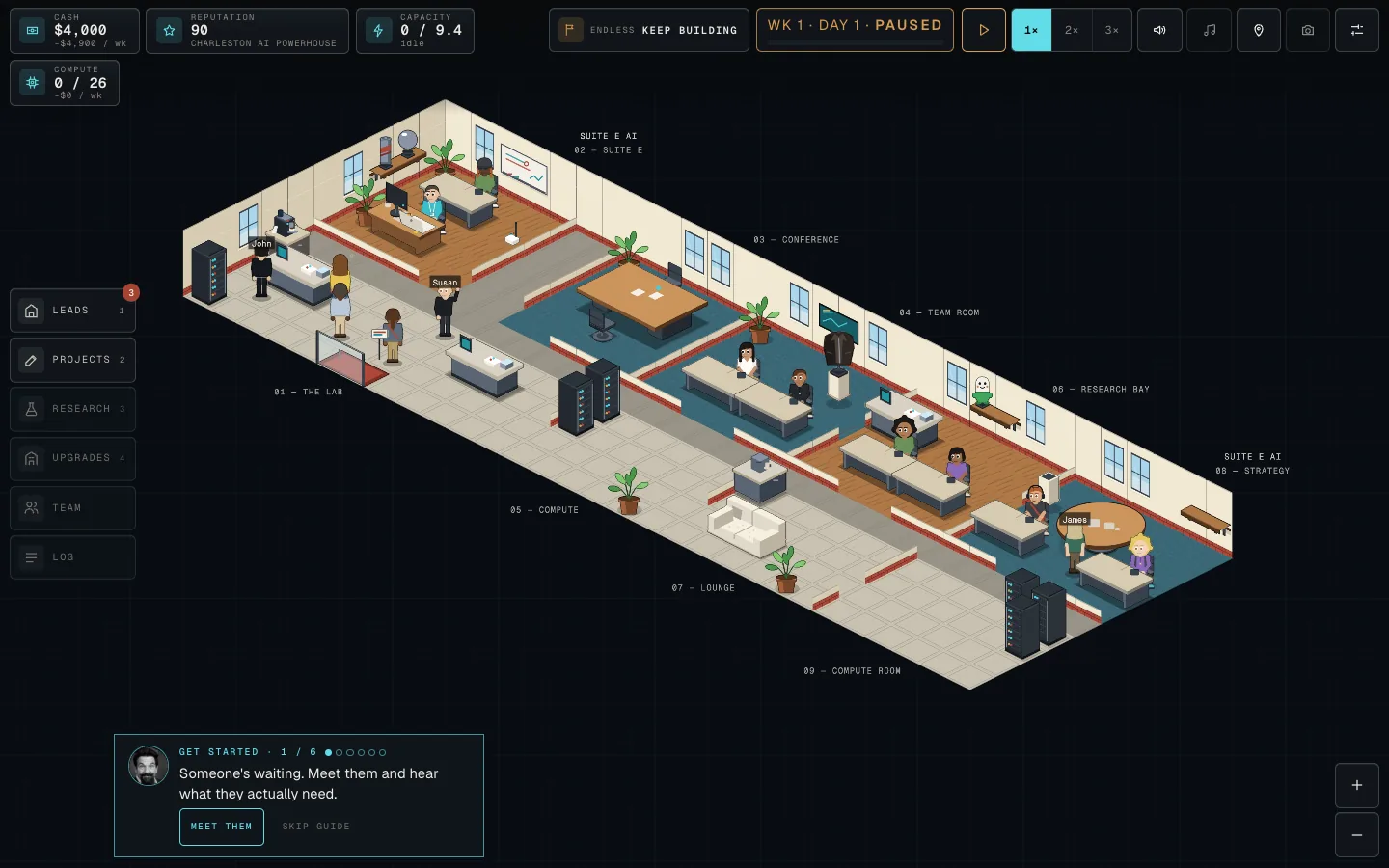
    Every sprite now runs through a single premium illustrated style at build time. New couch, coffee station, server racks, shelves and display plinths, with real contact shadows instead of soft blurs.

    A full Charleston AI office in isometric view: the lab, conference room, team room, research bay, lounge and compute room, with staff at their desks.
    A grown Lab, drawn in the authored style across every room.
    • One art direction across all six atlases, with no exceptions
    • Collectibles stand on a true isometric slab instead of a floating ellipse
    • Grounded shadows hug each footprint; no blurred sprite shadows remain
    • Alon has a bespoke look and portrait, alongside redrawn trophy art

    Worth knowing
    Three trophies still carry their old names (Golden Pump, Chrome Rocket, The GPU) even though the art changed. Renaming them is deliberately deferred.

  9. IMPROVED

    One thing at a time on screen, never a pile-up

    A single authority now decides what deserves your attention. Cards, ribbons and cast lines queue instead of stacking, so a cameo arrival, a milestone and an event card cannot land on top of each other.

    • At most one transient card, ribbon or toast on screen at any moment
    • Toasts no longer stack four deep; milestone bursts fold into one ribbon
    • Important cards wait for a quiet moment and never cover a meeting or sheet
    • The pause indicator moved into the clock instead of its own overlay
  10. IMPROVED

    Legendary cameos arrive spaced out, not in clumps

    Special arrivals used to cluster: two could show up back to back and then nothing for a long stretch. They are now scheduled so only one is ever at your door, with a guaranteed gap after each.

    • Only one legendary visitor can be at the door or in a meeting at a time
    • At least eleven lead opportunities pass before the next one can arrive
    • The next arrival is drawn once, when the last one closes, not rolled per lead
    • Who arrives is unchanged; only the pacing moved
  11. IMPROVED

    A clearer pitch before your first click

    The homepage and the /lab intro now say what the game actually is before you start, and the first client meeting has one obviously named next action.

    • The homepage states the game and offers two clearly labelled doors
    • The intro reads in about two and a half seconds before Take the office
    • The first-client button is now "Meet them" instead of "Show me"
    • After your first review, one card asks whether anything was confusing
  12. NEW

    Report a bug from inside the game, with a receipt

    If something breaks you can say so without leaving the game, and you get a report ID to quote back. It works offline and sends when you are back online.

    • Settings, Help, Report a bug, plus a line on every blocking modal
    • Three fields and a category; diagnostics are on by default and can be turned off
    • You get a receipt like LAB-XXXXX with a copy button
    • Reports made offline are saved and retried automatically

    Worth knowing
    Screenshots cannot be attached yet. Your save file, company name, founder name, project names, employee names and any contact details are never sent.

  13. NEW

    Things break in the office, and you deal with them

    The internet goes down, an API provider has a bad day, Gary touches something. A marker appears in the world, one card explains it, and you pick how to respond.

    • Three incidents in this first pass, starting with THE INTERNET IS DOWN
    • A marker and a pulse on the thing that broke; walk over or tap it
    • Two responses, with the tradeoff written on the button
    • No auto-pause, no company-wide penalty; a held project resumes on its own

    Worth knowing
    This is a deliberately small alpha: three incidents out of a planned pool of eight, no escalation, no employee assignment and no player toggle. It switches on for companies past the guide with three projects delivered, and the first incident arrives five to ten active minutes later.

  14. NEW

    This Week in the Lab: events that run for everyone

    Returning players learn what is happening in the Lab this week: a themed event with an objective, a chip on the HUD tracking progress, and a panel with the details and your past events.

    • A THIS WEEK chip beside the chapter badge, with progress like 1 / 3
    • A panel with the current event, its objective, when it ends and your history
    • Announced once on your return, and never reopened by a reload
    • Events end as Completed, Experienced or Withdrawn, never as Failed

    Worth knowing
    Events only reach companies that have delivered a first project and are past the guided start. If an event needs a newer build, the panel says Update required rather than activating it.

  15. EVENT

    Event #1: EVERYONE WANTS AI

    The first live event ran across every eligible Lab for four days, with a single objective: complete three projects before the window closed.

    • Objective: complete three projects while the event was active
    • A THIS WEEK chip on the HUD tracked progress toward it
    • Completing it kept the week's conditions running until the window closed

    Worth knowing
    The window ran from 6 September to 10 September 2026, 08:42 UTC at both ends. Finished events stay in your Lab's history, and any visitors still waiting when an event ends leave with it.

  16. WORLD

    Furniture rebuilt so you can tell what things are

    Desks, benches, tables and shelves were redrawn as real objects with tops, legs and materials, and props now sit properly on whatever surface holds them.

    • Box-model furniture instead of solid grey slabs
    • Props sharing a desk sort by where they stand, so nothing floats
    • Trophies on the north wall stand on an actual shelf
    • No seated character without a visible seat underneath them
  17. FIX

    Fixed faces that did not match their bodies

    Players reported generated people whose face was the wrong skin tone. Afro hair was being drawn over the face in the hair colour; hair that sits behind the head is now drawn first.

    • Six generated looks and the founding guest Ansem were affected
    • One canonical skin tone per person, now enforced in the art build
    • Only the affected frames changed; every other sprite is untouched
  18. FIX

    Reloading no longer loses completed projects

    A returning company could lose completed projects, leads and meetings whose client came from a later chapter's content. Found on production, where 23 projects loaded back as 14.

    • Clients that a chapter pack will bring back are now known at load time
    • Only content that nothing will ever restore is still dropped
  19. NEW

    A guided first project instead of a tutorial

    New players are walked through one real company loop: meet the client, listen, choose what to build, decide where the work goes, let it build, read the review. Nothing about the company is faked.

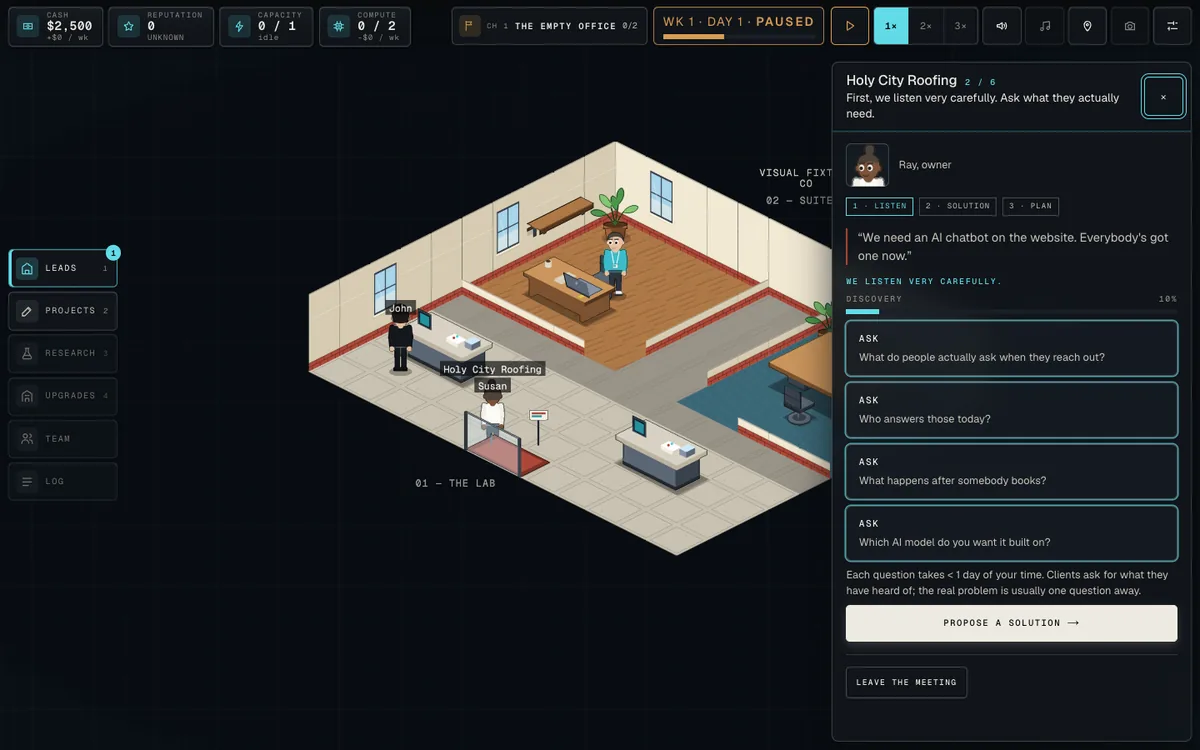
    A client meeting panel where the client asks for an AI chatbot, with four discovery questions the player can ask instead.
    The client asks for a chatbot. The real problem is usually one question away.
    • John speaks one line at a time and the world shows where to act
    • Six steps read from your actual company, so a reload never loses your place
    • Skip guide at any time; Settings, Getting started reopens it as a reference
    • Other panels dim while the guide speaks but still work if you go looking

    Worth knowing
    The guide teaches the first project loop and nothing else. Research, hiring and capacity are deliberately left for you to find on your own.

  20. WORLD

    The office redrawn so you can see into every room

    Interior walls became short cutaway stubs so nobody loses their legs behind a partition, the scale of everything was made consistent, and the camera now frames the room properly on a phone.

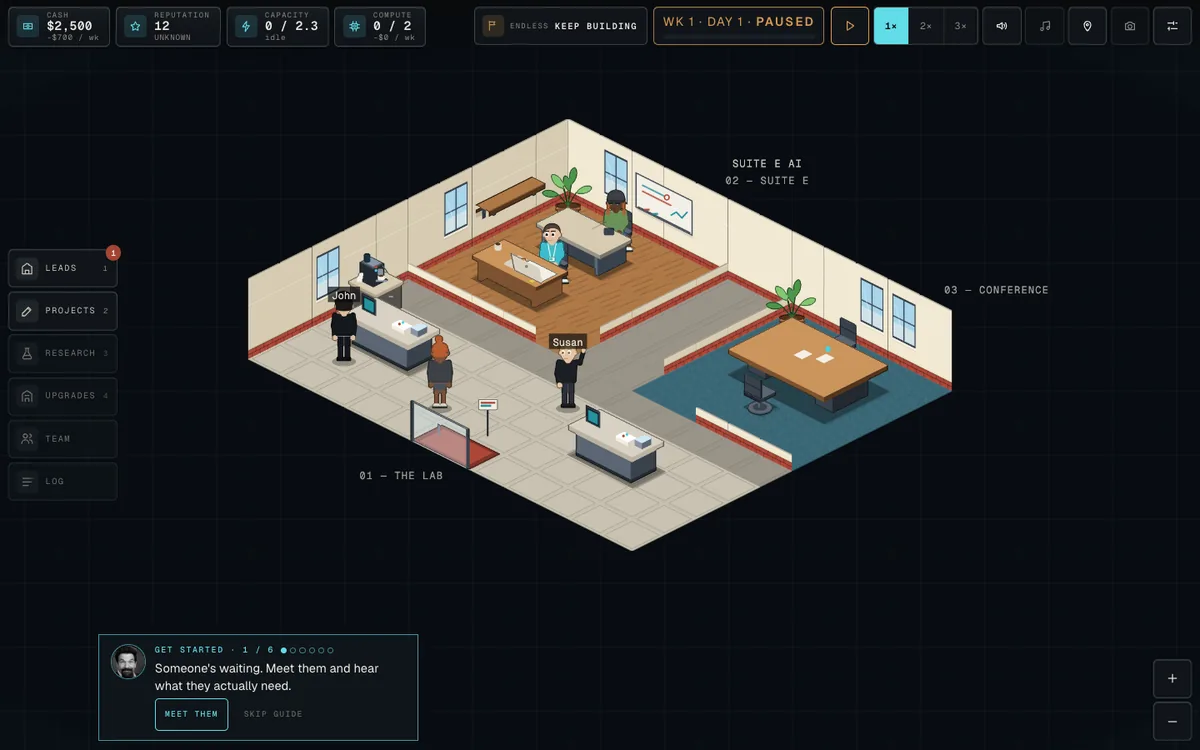
    A small starting office in isometric view with cutaway interior walls, showing the lab and the founder's desk.
    Interior walls became cutaways, so nobody loses their legs behind a partition.
    • Interior partitions became low cutaways; outer walls stand taller than a person
    • Flat materials with one light and one contact shadow, no gradients or blur
    • Monitors and laptops face the person actually using them
    • Per-stage framing that keeps the focus clear of the HUD on small screens
  21. FIX

    The world uses far less graphics memory

    Long sessions were holding well over a gigabyte of graphics memory, and changing the render quality leaked a whole copy of the world. Both are fixed.

    • Chrome graphics use dropped from roughly 1520 MB to roughly 500 MB at standard
    • Switching render quality no longer leaves the previous world resident
    • Verified pixel-identical across scenes, canvas sizes and both themes
  22. NEW

    Public alpha opens, with feedback built in

    The Lab went to public alpha, and a Send feedback panel shipped with it so players can say what they think in plain text without an account.

    • Send feedback from Settings and from the campaign finale
    • Anonymous plain text: no account, no email address
    • Works with analytics turned off
  23. NEW

    Come back after a break and get a recap

    Returning after six hours or more opens on your company's name, what happened last time, what needs a look right now, and what you were working toward.

    • Three highlights drawn from your six most recent moments
    • What needs attention now, written in the game's own words
    • Your next campaign milestone, with a progress bar where there is a number
    • Nothing ticks while the recap is on screen

    Worth knowing
    A reload sooner than that opens the Lab directly, the way a backgrounded tab does. New players get the opening exactly as before.

  24. NEW

    Export and import your save as a file

    Settings now tells you where your save lives and when it last saved, and lets you export it to a file and import it back, which is how you move a company between browsers.

    • SAVED, SAVING or SAVE FAILED status with where and when
    • Export writes a checksummed file; import validates it before touching anything
    • Reset moved into a Danger zone with its own confirmation

    Worth knowing
    The save lives in that browser only, and Settings says so plainly. A failed import leaves you exactly where you were.

Take the empty office.

One desk, one laptop, $2,500, and nobody who has heard of you yet. Everything on this page is what happens after that.

AI STATUSALREADY HERE